

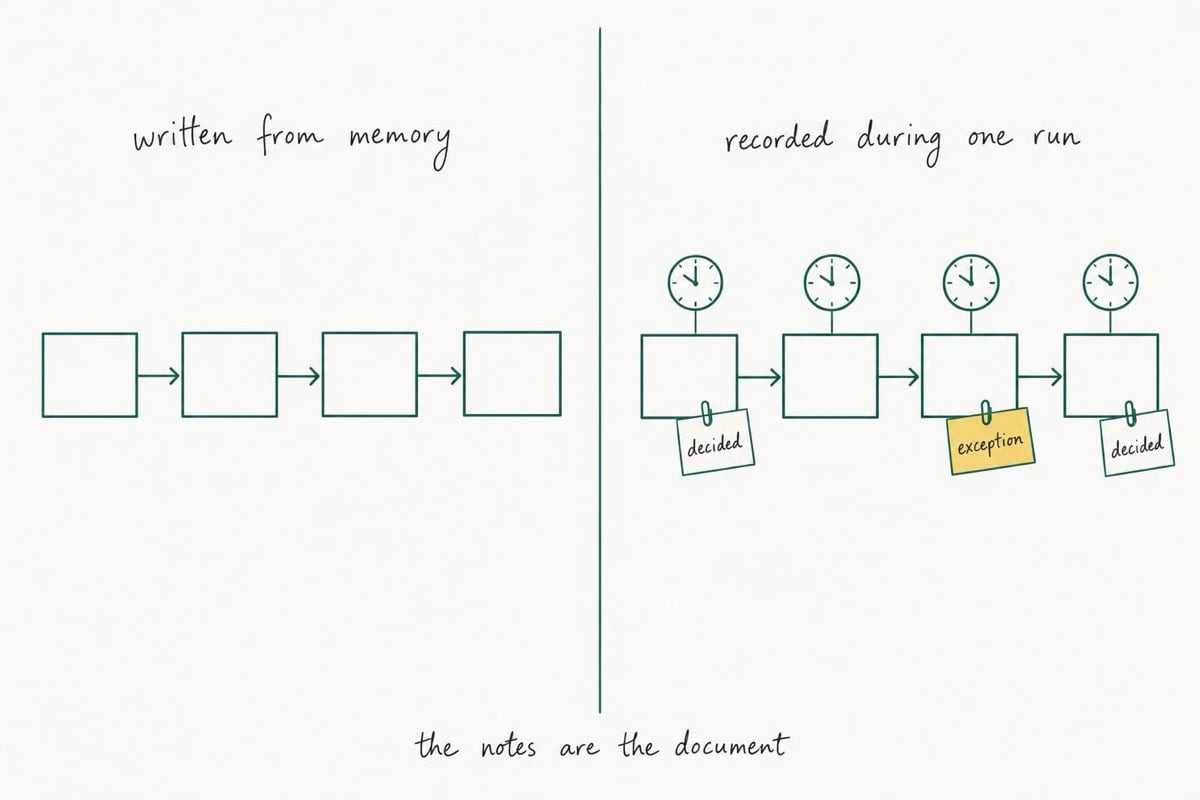
A document business processes template works when you fill it in during a live run of the job, not afterwards from memory. Open it the next time the work comes up, write each step as you finish it, and record every decision you make and every exception you handle along the way. Filled in later, from recall, the same template gives you a tidy list of steps that nobody else can actually follow.
You know the Sunday night version of this. You find a free process documentation template, make coffee, and twenty minutes later you have four lines. Get brief. Do the work. Send invoice. Chase payment.
All true. None of it is the job.
So you close the tab, because the document you just wrote would not help the contractor you were hoping to hand this to, and you already know it.
That is not a writing problem. You have run this job eighty times, and the parts that make it work have gone quiet.
Why the Template Goes Blank When You Sit Down to Fill It In
Practice makes work harder to describe, not easier. As a repeated job becomes automatic, the running commentary that came with learning it drops away, so what you can summon at the kitchen table is a summary rather than a procedure. The steps you remember are the visible ones. What goes missing is the judgment between them, and a blank form has no way to prompt that out of you.
You have probably already tried the standard repairs. Recording a screen share while you talk through the job. Dictating it into your phone on the drive home. Paying for the software with the nice template library. Each changes where the words land, none changes the problem: you are the only source, and your recall is editing itself. Search for a document business processes template and you get the same grid every time, step number, description, owner, which is the easy third of business process documentation and the third you did not need help with.
Research on skill learning describes an automatization stage in which the describable version of what you know becomes hard to retrieve, while the performance itself keeps running fine [1]. That is an account of how skills settle rather than a study of owners filling in forms, so treat it as a reason to distrust your memory here, not proof.
The sharper finding comes from medicine. When three experienced surgeons were asked to teach a procedure they knew well, their unprompted descriptions covered about 44 percent of a 46-step reference standard. Decision steps fared worst: roughly three quarters of them went unmentioned. Structured prompting pulled the average coverage up to about 66 percent [2]. Three surgeons teaching one emergency airway procedure is a small, specific study, and it says nothing directly about client onboarding. What transfers is the shape of the error: the decisions are the first thing to disappear from an expert's account of their own work, and prompts recover a good share of them.
Which means the fix is not more discipline about writing. It is changing when you write, and what the page asks you.
Record One Real Run Instead of Writing a Document
Stop treating this as authoring and treat it as recording. The next time the job runs, keep the template open beside the work and fill it in as you go, step by step, with the clock. You are not composing a manual for all future cases. You are capturing one actual pass through the work, including the two or three moments where you quietly decided something. The general version can come later, from three recorded runs.
The cost is real and small. The run you document takes longer, because you stop four or five times to type a line. You pay that once per process.
It also changes what the fields are for. On a blank template they look like headings waiting for tidy sentences. During a live run they work as interruptions. "What did you just decide?" is a question you can answer in eight seconds with your hand still on the mouse, and cannot answer at all three weeks later. The surgeons' coverage rose when someone prompted them; here the template does the prompting.
One rule keeps this honest. Write what you did, not what you meant to do. If you skipped the deposit check because the client is an old one, that line goes in. The exception is not a failure to document around, it is the most valuable thing on the page.
The Eight Fields a Usable Process Template Needs
Eight fields carry a process across a handoff: name and trigger, owner, inputs, steps with times, decision rules, exceptions, output and definition of done, and a review date. The templates ranking for this search mostly hand you three of them: name, steps, owner. The two that decide whether the document survives a real week are the decision rules and the exceptions, and they are the two almost nobody includes, because from memory they are invisible.
This eight-field list is ours, not an industry standard. It is the shortest set we could write that still holds up when someone else runs the job. Add the two missing fields to whatever document business processes template you already downloaded rather than starting over.
1. Name and trigger. Not "Onboarding" but "New client onboarding, starts when a signed proposal lands in the inbox." Without a trigger, nobody but you ever starts the process, because only you can feel when it is time.
2. Owner. One name, even if it is yours for now. Write the name you expect it to be in six months, because that tells you how much explaining the document has to do.
3. Inputs. What must exist before step one is possible. Signed proposal, deposit cleared, brand files received, access granted. A stall at this point looks like somebody dragging their feet, right up until you write it down as a missing input instead.
4. Steps, with the clock. Each step gets a line and a time: how long the doing took, and how long the job then sat waiting. Keep both numbers. If the waiting dominates, you have a flow problem rather than a documentation problem, and our guide to how to streamline business processes picks up exactly there, assuming the steps are already written down.
5. Decision rules. Every point where you chose, with the rule as you actually apply it. "Under 1,000 dollars, schedule it without asking me." "Rush job, add 30 percent, no exceptions." This is the field your memory loses first and the one that makes a handoff possible, because without it the other person has to come back to you for every fork in the road.
6. Exceptions. What went sideways on this run and what you did about it. The client sent files in the wrong format. The supplier portal was down, so you phoned the order through. Document the workaround you used, not the ideal path you wish you had followed.
7. Output and definition of done. What exists at the end, and the test that says it is finished. "Invoice issued, files uploaded to the client folder, follow-up task set for day 14." Vague endings are why handed-off work keeps coming back, and shipping a definition of done is the part of the process of delegation that is easiest to leave out. It is also what turns handing over a task into handing over the decisions attached to it.
8. Review date. A date and a person. Three runs or ninety days, whichever comes first. A procedure nobody revisits quietly turns into misinformation, and then someone new follows it into a wall.
Fields five and six are the ones to protect when you are tired. If you only capture decisions and exceptions, you have something useful. If you only capture steps, you have the four bullets you started with.
What a Filled-In Template Looks Like After One Run
A filled-in version is shorter and stranger than you expect: a page of plain lines, some of them slightly embarrassing. The examples below are composites we wrote to show the shape, not clients, and the numbers are illustrative. What matters is how much of the page is decisions and exceptions rather than steps, because that ratio is the difference between a document someone can run and a list someone has to interpret.
Copy these nine lines into whatever you write in, then fill them in as the job runs.
Process name:
Trigger (what starts it):
Owner (now / intended):
Inputs that must exist before step 1:
Steps, each with doing time and waiting time:
Decision rules (if X, then Y):
Exceptions this run, and what you did:
Output and definition of done:
Review date and who runs the review:
Curtis runs a one-person web design studio and documented new client onboarding on a live job in March.
Trigger: signed proposal in the inbox. Owner: Curtis, intended owner a part-time project assistant by autumn. Inputs: signed proposal, 40 percent deposit cleared, logo files, hosting login.
Steps: welcome email with the intake form, 12 minutes, then four days waiting on the form. Kickoff call, 45 minutes. Staging site set up, 25 minutes. Content request, 8 minutes, then nine days waiting.
Decision rules: deposit under 40 percent means no kickoff call gets booked; an existing client can skip the intake form and go straight to the call; more than two rounds of content chasing and the schedule slips by a week, said out loud on the call rather than discovered later.
Exceptions this run: client sent logo as a photo of a business card, so Curtis rebuilt it and logged 90 unbilled minutes. Hosting login belonged to a former employee of theirs, which took six days to resolve.
Done: staging site live, content loaded, launch date agreed in writing.
Review: after three more onboardings, Curtis.
Read that back and the useful facts jump out. Both long delays were waiting on the client, so both are fixable with an input rule rather than a faster worker. The unbilled 90 minutes is visible, which is how it becomes a line item next time. And an assistant could run most of this by autumn, because the decisions are written as rules rather than instincts.
Bonnie, who runs a three-chair salon, documented the weekly supplier reorder, and her page is mostly exceptions: two products from a second supplier, one brand that ships only on Tuesdays, a rule that colour stock gets reordered at two units left. The steps took four lines. The exceptions took eleven, and they are why her stylist can order without texting her on a day off.
"I'm the Only Person Who Does This Work"
Then you are the single point of failure, and the document is for three specific moments: the week you are sick, the month you take on help, and the Tuesday in six weeks when you cannot remember what you decided about a client's rush fee. Writing it down also makes the job improvable. A process you can see is one you can cut steps from, and nothing you have never written down has ever gotten simpler on its own.
Be honest about what a written procedure does, though, because the strongest evidence here cuts both ways. When the World Health Organization's surgical safety checklist was introduced at eight hospitals in eight cities as part of its Safe Surgery Saves Lives program, deaths fell from 1.5 percent to 0.8 percent and inpatient complications from 11.0 percent to 7.0 percent [3]. When the same kind of checklist was adopted across 101 hospitals in Ontario, it moved nothing: adjusted mortality 0.71 percent against 0.65 percent, complications 3.86 percent against 3.82 percent, neither difference statistically significant [4].
Both are hospital studies, not small-business ones, so what transfers is the mechanism rather than the size of the effect. The document does nothing by itself. The most plausible reading of the two results, and it is a reading rather than something either study set out to test, is that what differed was how the checklist was introduced and used, not what was printed on it. A procedure in a folder nobody opens is decoration.
Which argues for documenting less than you think. Pick the jobs that repeat often, cost money when they go wrong, or would have to be explained in a hurry, which is roughly the same filter as working out which tasks you should be delegating. Two or three a year is the pace we would aim for in a business with one or two people. If everything feels equally urgent, a priority scale that forces an actual choice beats ranking by irritation, and if there is nobody to hand anything to yet, that is a separate decision about when to hire in your small business.
Writing it down can also feel like losing control of how the work gets done. The document answers that fear rather than causing it: vague handoffs are what produce the disappointing results that make owners hesitate to delegate for another year.
Start With the Job You Run Next Week
Pick the job that comes up in the next seven days and that you would hate to explain over the phone while on holiday. Put the eight fields in whatever you already use: a doc, a notes app, a sheet of paper on a clipboard. Then run the job the way you always do, and stop four or five times to write a line.
There are tools built for documenting systems as well, and they start helping once you know what goes in them.
Protect two columns above all: what you decided, and what went wrong. If your page ends up mostly steps, you wrote it from memory after all, and a document business processes template filled in from memory is just a tidier version of the four bullets.
Set the review date before you close the file. Three runs, or ninety days. Then leave the second process until next month rather than doing all of them this weekend, because documenting the whole business in one sitting is the same move as downloading the blank template, and that evening already has a track record. If the real problem turns out to be direction rather than process, failed business strategies is the other half of the conversation, and time management for entrepreneurs covers protecting the hour this takes.


