
We all know that Mark Zuckerberg and his Facebook buddies are prying into our personal data a bit more than they should. Even when there was no concrete proof, most were aware that there was something funky going on with the biggest social media website in history.
It would seem, however, that those in control of Facebook finally decided to come out and say, point blank, that they will use your browsing history to provide advertisers with the information they need to target you with more specialized ads.
How does this work? Well, basically speaking, when you visit certain websites they load these things called “cookies” onto your computer, which are used to help your browser remember which sites you like visiting for future reference. What Facebook is doing is using this data so that advertisers know what kinds of products you’re interested in. This means if you look for shoes or computers a lot, you’ll see more ads related to those items on Facebook.
The only way to opt out of this is to manually change some settings. That’s right; they aren’t giving you any real options, you either find out on your own how to remove yourself from their new “service” or you’re stuck handing over your personal data to them. Infuriating? Yeah, just a little bit. Below you’ll find a step-by-step process by which you can release yourself from Zuckerberg’s grasp, at least by a tiny amount.
When you feel comfortable with your selections, click submit. It’ll take a moment to process, and then, you’re in the clear! Well, sort of. There are still a million other things out there on the internet stealing your data, but at least you’ll be protected from the almighty Facebook (well, mostly)!
Of course, the only way to ensure your safety would be to stop using Facebook…
If you’re an iPhone or iPad user, go to Settings, General, and then Restrictions. Scroll down to the section labeled Privacy, and tap on Advertising. Switch "Limit Ad Tracking” to on and you’ll be good.
For those of you with an Android device, go to your Google settings, find “Ads,” and check the box that says “opt out of interest-based ads.” Now you’ll be safe from creepy advertisements as well.
Will these protect you from all of Facebook’s data collection practices? Probably not, since it’s likely they do a ton of stuff in the background that they never tell us about. At the very least though, you can opt out of one of the creepier ways in which they track your browsing history, and for that we should be thankful.
For more information on Facebook’s complete privacy policy, head here, and read through it to your heart’s content. You’ll probably find a lot of moderately disturbing stuff there.
If you have any more privacy related tips or suggestions, feel free to comment below!
It would seem, however, that those in control of Facebook finally decided to come out and say, point blank, that they will use your browsing history to provide advertisers with the information they need to target you with more specialized ads.
How does this work? Well, basically speaking, when you visit certain websites they load these things called “cookies” onto your computer, which are used to help your browser remember which sites you like visiting for future reference. What Facebook is doing is using this data so that advertisers know what kinds of products you’re interested in. This means if you look for shoes or computers a lot, you’ll see more ads related to those items on Facebook.
The only way to opt out of this is to manually change some settings. That’s right; they aren’t giving you any real options, you either find out on your own how to remove yourself from their new “service” or you’re stuck handing over your personal data to them. Infuriating? Yeah, just a little bit. Below you’ll find a step-by-step process by which you can release yourself from Zuckerberg’s grasp, at least by a tiny amount.
1. Go to the Digital Advertising Alliance’s website.
Here’s a link to it. Note that in order for this site to work properly, you’ll need to turn off AdBlocker Plus (or anything else that prevents cookies from being loaded onto your computer). Which is ironic in itself actually…a website that allows you to opt out of targeted ads…but disallows the use of AdBlocker. Huh.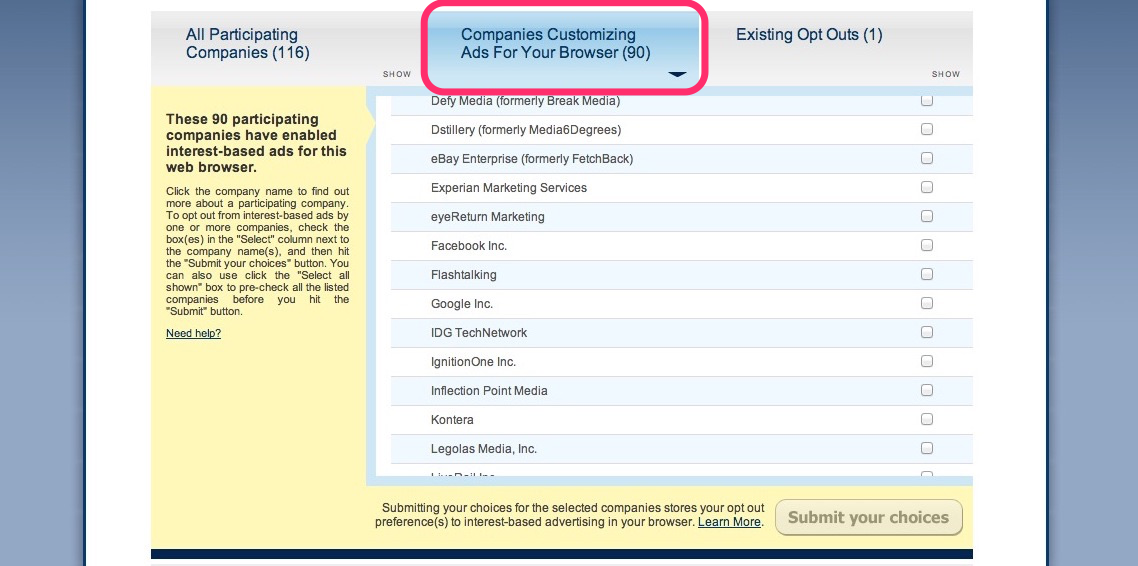
2. Find Facebook.
Once you’re there, you’ll see the screen shown above. Click on “Companies Customizing Ads For Your Browser.” There you’ll see a list, and you’ll want to go down until you find “Facebook Inc.”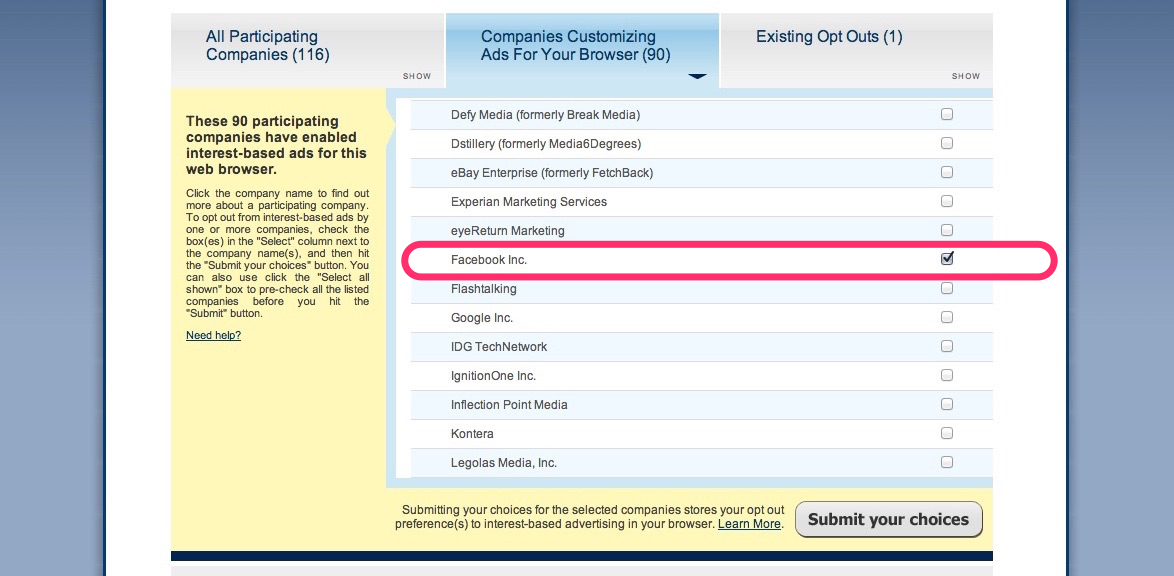
3. Tell Zuckerberg to spy on someone else!
Once you’ve located Facebook, check the box next to its name (on the right hand side). While you’re at it, feel free to opt out of other website’s ad programs by checking them on this list as well.When you feel comfortable with your selections, click submit. It’ll take a moment to process, and then, you’re in the clear! Well, sort of. There are still a million other things out there on the internet stealing your data, but at least you’ll be protected from the almighty Facebook (well, mostly)!
Of course, the only way to ensure your safety would be to stop using Facebook…
Bonus section: Dealing with the Facebook app.
The above steps will protect you from the browser-based Facebook…but what about that app you use all of the time on your smartphone or tablet?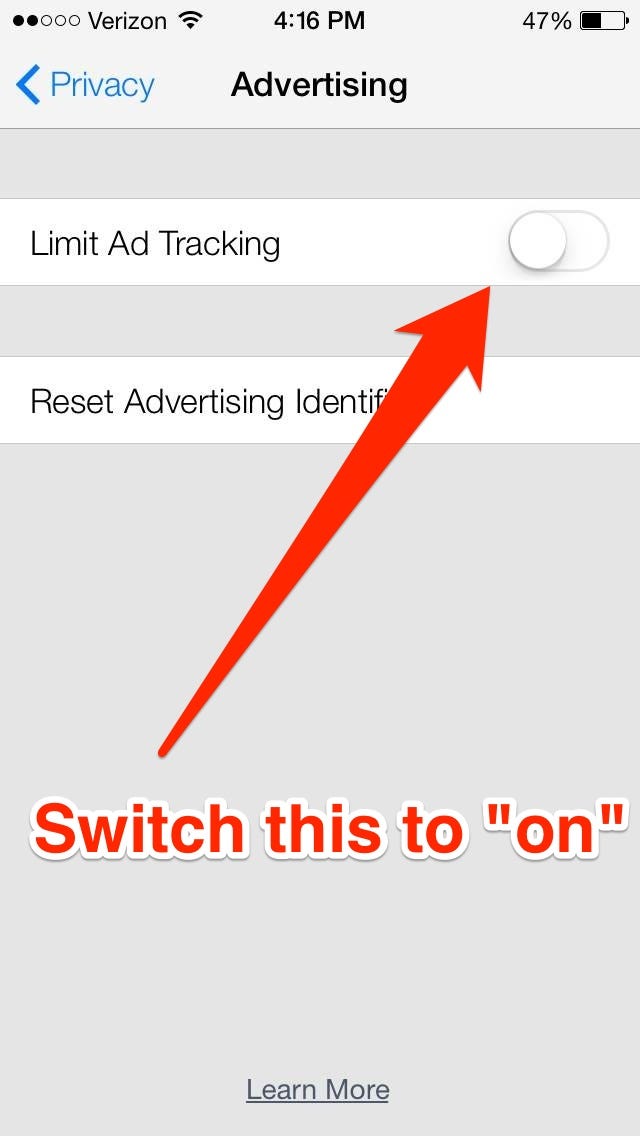 iOS users
If you’re an iPhone or iPad user, go to Settings, General, and then Restrictions. Scroll down to the section labeled Privacy, and tap on Advertising. Switch "Limit Ad Tracking” to on and you’ll be good.
 Android users
For those of you with an Android device, go to your Google settings, find “Ads,” and check the box that says “opt out of interest-based ads.” Now you’ll be safe from creepy advertisements as well.Will these protect you from all of Facebook’s data collection practices? Probably not, since it’s likely they do a ton of stuff in the background that they never tell us about. At the very least though, you can opt out of one of the creepier ways in which they track your browsing history, and for that we should be thankful.
For more information on Facebook’s complete privacy policy, head here, and read through it to your heart’s content. You’ll probably find a lot of moderately disturbing stuff there.
If you have any more privacy related tips or suggestions, feel free to comment below!