
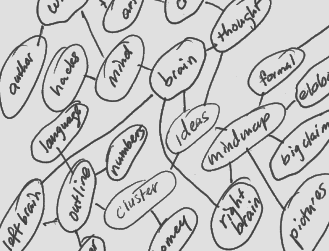
I’m not a big fan of mind mapping, though I concede that it does have its uses. Recently, I learned of a different approach to brainstorming that seems both more practical and better grounded in the way the mind works than traditional, Buzan-style mind mapping. This approach, called the Rico Cluster after its developer, Dr. Gabrielle Rico, focuses on the creation of a “web” of related and interconnected ideas, rather than radiating out from a central concept, and is intended to leverage the brain’s normal processes of communication between the right and left hemispheres. The idea is to work towards a kind of “critical mass”, where the language- and process-oriented left brain takes over from the visual- and pattern-oriented left.
What is a Rico Cluster?
Rico clustering is a brainstorming tool that emphasizes the connection between left-brain openness and connection-making and right-brain verbalization and ordering. Although it is intended primarily as a writing tool, it can also be applied to teaching — and Rico herself has written about its use as a therapeutic tool, as well.
Here’s the basic idea:
- Write a word in the middle of a sheet of paper.
- Circle it.
- Write down the first word or phrase that comes to mind and circle it.
- Draw a line connecting the second circle to the first.
- Repeat. As you write and circle new words and phrases, draw lines back to the last word, the central word, or other words that seem connected. Don’t worry about how they’re connected — the goal is to let your right-brain do its thing, which is to see patterns; later, the left-brain will take over and put the nature of those relationships into words.
- When you’ve filled the page, or just feel like you’ve done enough (a sign of what Rico calls a “felt-shift”), go back through what you’ve written down. Cross out words and phrases that seem irrelevant, and begin to impose some order by numbering individual bubbles or clusters. Here is where your right-brain is working in tandem with your left-brain, producing what is essentially an outline. At this point, you can either transfer your numbered clusters to a proper outline or simply begin writing in the order you’ve numbered the clusters.
By the time you’ve started reviewing your clusters, your brain has done much of the work of fleshing out your ideas; all that remains is to put these relationships into words, which is what your left-brain excels at.
The Rico cluster grabbed my attention because I’ve lately been thinking a lot about how to brainstorm alone and this seems to fit the bill. I suppose “regular” mind mapping would do the trick, but I was pretty put off by the extravagant claims made by mind-mapping advocate Tony Buzan; clustering seems much more down-to-earth and homey than Buzan’s elaborate, multi-colored, goal-oriented mind maps. Maybe that’s just me, and I’ve bought into mind mapping under a different name; so be it.
Rico Clusters as a Teaching Tool
While my interest is in clustering as a brainstorming-for-one tool, it is easily adapted to a group situation, where ideas are thrown out and jotted quickly on a whiteboard. What’s missing, though, is the patterning — someone needs to draw the lines that form the clusters.
A teacher or facilitator could do this, using the role of pattern-maker to subtly guide the discussion, but another option would be to have a student or, in a business setting, one of the brainstormers, take on this role, perhaps rotating and having a series of people draw in connecting lines. When the ideas start drying up (or the board is full) begin the process of sorting out and numbering ideas, with input from the group.
There is some evidence that brainstorming as a group is actually less effective than several people brainstorming individually and just combining their results, so I’m not sure I advocate this as an idea-generating tool. Instead, I see it as a way of helping a class draw lessons from a body of work — a book or play, a movie, a trip, or an experience. In a business setting, this might be a way to draw lessons out of a strategic failure, or develop new ways of applying existing processes.
Clustering as a Therapeutic Tool
Rico’s book Pain and Possibility: Writing Your Way through Personal Crisis suggests another use for clustering: using them to draw out unconscious sources of pain in the context of recovery and healing. While this is exactly the kind of extravagant claim I generally reject, it might be useful for other people so it at least deserves consideration. A feeling or source of pain is listed as the “seed” and ideas free-associated off of that. The process is akin to automatic writing, where the mind starts calling forth language and concepts without conscious filtering; hopefully we surprise ourselves with connections we hadn’t been aware of, or conflicts that we had carefully concealed from our conscious awareness.
Like I said, this isn’t the kind of thing I think generally works, but for some people this kind of emotional work proves very uplifting, so who am I to judge? For myself, I think I’ll stick with trying clustering to deal with the more mundane problem of generating and capturing writing ideas. If nothing else, it’s at least worth a try, especially if you’re the kind of person for whom traditional outlining is a real chore.


[...] selamo wrote an interesting post today onHere’s a quick excerpt [...]
I use MindManager to do basic Mind Mapping brainstorming and it works great for that. But, I have always wanted to do more of what is explained in this blog.
Does anyone have any suggestions on software tools for doing Rico Clusters or know of a way to do it in Mind Manager?
MindManager in “brainstorm mode” is close to the same thing. Just re-arrange into clusters afterwards and you’ve created a nice mindmap.
I also prefer MindJet’s MindManager because it is less “artsy” than other Buzan-style applications. I prefer the clean and professional look of MM, plus it integrates really well with the whole Office suite.
[...] Posted in Daily life tagged creativity at 10:37 am by LeisureGuy Sounds like a kind of candy bar, doesn’t it? It’s not: it’s a tool akin to mind-mapping, but not the same. Looks interesting. [...]
I think you can do just what you want in the brainstorming mode of MindManager. You don’t get to draw the connecting lines until step two (or you can bail completely and just dump it all to the map.
The only problem is that hierarchy is imposed unless you use the relationship arrows to draw your connections.
The other tendency is that MindManager wants you to connect back to the central idea, and keeps trying to make that connection, but if you drag your ideas far enough to the right or left, it lessens “the pull”.
After thinking about it for a second, I guess you don’t even need to go to “brainstorm” mode if you just use floating topics.
Start well off to the left of your central topic, click once and type, hit enter and a new floating topic gets created. I find I can go pretty quickly and get in the flow. Once again, you can use relations ships to draw the connective threads.
I am a fan of old-fashioned mindmapping, but if all you have is a hammer everything looks like a nail, as they say.
Mind mapping works best when you want to focus on a subject. Rico maps work best when you don’t know exactly where you’re heading.
Jeff, The best software I’ve found so far to produce non-hierarchical maps is Cayra (http://www.cayra.net/). Worth a look.
[...] Dustin Wax put an intriguing blog post on Rico Clusters: An Alternative to Mind Mapping.Here’s a quick excerpt:Rico’s book Pain and Possibility: Writing Your Way through Personal Crisis suggests another use for clustering: using them to draw out unconscious sources of pain in the context of recovery and healing. While this is exactly the kind of … [...]
Very cool, I’ve tried mindmapping and find sometimes my thoughts end up in places I didn’t intend to be. Sometimes this is a good thing and other times it can be confusing and muddies the message.
I will have to try this method.
You’ve got your sides of the brain mixed up. Left is verbal, linear, digital; right is more gestalt, “emotional”, etc.
I saw one place where I made that mistake and corrected it — thanks! Let me know if there’s any others — I might have been having a right-brain day!
[...] Rico Clusters: An Alternative to Mind Mapping – lifehack.org Rico clustering is a brainstorming tool that emphasizes the connection between left-brain openness and connection-making and right-brain verbalization and ordering. (tags: http://www.lifehack.org 2007 mes9 dia25 at_tecp mind_maps creativity) [...]
Are not this just the same as the “concept maps”?
Check http://cmap.ihmc.us/
….there is also a very nice tools to make them
Mario
[...] Rico Clusters: An Alternative to Mind Mapping – lifehack.org Good tool for fleshing out ideas (tags: brainstorming business career creativity education health notetaking lifehacks thinking) [...]
An Alternative to Mind Mapping
I’d never heard of Rico Clusters before reading this great article on lifehack.org. it appears to be a great way to brainstorm and organize one’s thoughts, and with far less effort than Mind Mapping.
What is a Rico Cluster? Author Dustin Wa…
[...] ended up just scribbling all over the page. But that’s OK. Discombobulated mind maps are Rico Clusters, apparently, and there’s even a book about [...]
If you can deal with crude graphics, Axon Idea Processor seems the most flexible. Cmap is absolutely excellent, too. The main advantage of these tools is that they don’t force you into a tree-like format. As Christopher Alexander said, “The City is not a Tree.” Neither is the brain.
One more vote for concept maps:
http://en.wikipedia.org/wiki/Concept_map
Let’s minimize unneeded hierarchies!
[...] Rico Clusters: An Alternative to Mind Mapping (tags: mindmapping gtd psychology psychotherapy creativity education) This entry was written by Craig and posted on October 28, 2007 at 6:18 pm and filed under Bookmarks. Bookmark the permalink. Follow any comments here with the RSS feed for this post. Post a comment or leave a trackback: Trackback URL. « links for 2007-10-25 [...]
[...] Rico Clusters: An Alternative to Mind Mapping I think I tried something like this once, but I didn’t know what it was called [...]
[...] just been reading lifehack.org and learnt about something called Rico clusters. It’s an interesting way of ‘mindmapping’ and seeing as I’m strapped for [...]
[...] probably heard of mind mapping. Well, Rico Clusters is similar but it attempts to use both halves of the brain. Worth checking out. Leave a [...]
[...] Tan even said there are no wrong answers here.) You might have used the freewriting technique, clustering/mindmapping), a list, or whatever works for [...]
[...] Read the rest of this great post here [...]
[...] Organic created an interesting post today on Rico Clusters: An Alternative to Mind MappingHere’s a short outline [...]
This sounds pretty good. It’s like traditional brainstorming, I feel, but with the added left-brain thinking of ordering everything.
[...] Rico Clusters: An Alternative to Mind Mapping [...]
[...] Le più note ed utilizzate sono il brain storming, le mappe mentali o sistemi più raffinati come i Rico Cluster. io personalmente nel tempo ho sviluppato una predilezione per il sistema delle Keywords, che [...]
[...] knowledge mapping methods include clustering and concept mapping. Clustering (sometimes called “Rico clustering,” attributing its originator, Gabrielle Rico) [...]
[...] Rico Clusters: An Alternative to Mind Mapping [...]
[...] Rico Clusters: An Alternative to Mind Mapping [...]
[...] who had learned it from Gabriele Rico’s book Writing the Natural Way. Dustin Wax describes the technique nicely on his blog, and you can see a Flash animation of clustering in action at the top of Rico’s [...]
실내 온도를 빨리 올리고 싶다면 가습기를 튼다
외출 후 돌아와서 집이 추울 때 보일러 온도를 무작정 높이지 말고 적당한 온도로 맞춘다.
대신 가습기를 틀어 집에 습기를 더한다.
보일러를 작동시키면 바닥이 덥혀지면서 집이 따뜻해지는데,
습도가 높으면 공기 순환이 빨라져 집이 빨리 데워지는 효과가 있다.
출처:다음카페 생활의지혜!
[...] Rico Clusters: An Alternative to Mind Mapping [...]
PersonalBrain can do this- essentially a mind map without a central node and that doesn’t have to be hierarchical. They have a neat video by the dude who did the Connections TV series with a really cool map.
Down with hierarchy!
…
Err… sorry, no.
Hierarchy is VERY important in my thinking, provided that the hierarchical relations are not transitive and totally free to use.
It is a very great software I was looking for so long by now. Other “Mindmanagers” only good for set boundaries for your mind! This one expands it!
Five stars!
[...] Hampshire, who had learned it from Gabriele Rico’s book Writing the Natural Way. Dustin Wax describes the technique nicely on his blog, and you can see a Flash animation of clustering in action at the top of Rico’s [...]
[...] Rico Clusters: An Alternative to Mind Mapping [...]
[...] Rico Clusters: An Alternative to Mind Mapping [...]