April 27th, 2009 in Productivity

9 Lists To Keep Updated, and Keep Handy

1512612245_733f207159

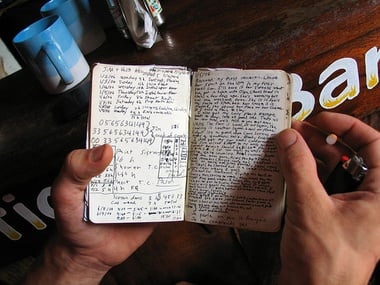
I bought a Moleskine notebook a long time ago, and for a while it got zero use. My productivity system is totally digital and Web-based, as is my personal journal. I bought the Moleskine because it looked awesome, and because so many other people found it useful.

The Moleskine, though, made its way into my pocket or backpack all the time, because of one simple use I found for it: a list manager. Not a list of things to do, or people to call – different lists. The Moleskine is my perfect list-manager, and that’s all I use it for.

That said, I’ve also discovered how useful it is to keep a small number of lists both updated and handy at all times, for a whole variety of uses. Here are nine lists that can be enormously helpful to all of us, if kept both current and accessible. Keep them wherever you like (for me, a Moleskine), but make sure you keep them.


“Things I Want” 


Every year, people I know ask me what I want for my birthday, or for Christmas, or just because they love giving me gifts (that last would would be nice, huh?). Usually, I have no idea what to tell them. That’s why I’ve started keeping a list of things I want – every time I hear about or come across something I’d like to have, no matter how big or small, it goes on my list.

If I get it, or don’t want it anymore, it goes away. It’s simple, but having this list gives me a running tally of stuff I actually want, so I’m not just telling my family and friends “anything’s great, seriously…” and then pretending to like what I get.


“Gift Ideas” 


This one’s on the opposite side of gift-giving. If I think of something that would be a great gift for a person I might some day buy a gift, I write down something like “Mom – Rollerblades.” That way, when my Mom’s birthday comes up and I realize I haven’t been paying attention for a whole year, I’ve got some backup ideas. This one, more than all the other lists here, has come in handy over and over in my life.


“Got a Minute?” 


We all have things that we’d like to do, but that aren’t required of us and that have no consequences whether we do them or not. I keep those things in my “Got a Minute?” list. If I have some free time with absolutely nothing to do, I’ll take a stab at something on my list. If they don’t get done, it’s not a big deal – it’s full of things I’d like to do when there’s nothing better or more important to do.


“Watch, Read, Listen” 


Another critical one for me, as a music and movie junkie. If a movie gets suggested to me, or I’m told I absolutely have to hear a particular band, they go on the list. If I have some time, I’ll go through the bands and see if there’s anything good. If I’m in need of another book, I try to pull one from my list rather than just reading whatever’s nearby. These lists are populated by friends, blogs, and any other source you can think of, and they’ve provided me with a ton of great movies, music, and books.


BHAGs 


BHAGs, or Big Hairy Audacious Goals, are an important thing for anyone to keep updated. These are goals that are way beyond what you think is possible, and are things you’re constantly keeping in mind with every decision or choice you make. For most, these goals are career-based, but they don’t have to be. What do you want to do, or be, or accomplish? Keeping this list handy will help keep you centered and focused in all things you do.


Bucket List 


We’ve all heard of bucket lists before – lists of things to do before you die. These might overlap with the BHAGs list, but not necessarily. For instance, “spend a night in jail” is proudly on my bucket list, but I wouldn’t exactly call that a goal. Keep a list of things you want to do – need to do before you die, both to help you get them done and to help you figure out what’s important. If “go to New Zealand” is on your bucket list, it’s worth saving for rather than taking a less-awesome trip somewhere else.


“Don’t Forget” 


This is a list for random, momentary stuff that you need to remember – but not remember forever. Things like “new guy at work is Jim” or “mail taxes” go on this list – review it periodically (I check mine every morning) and get rid of whatever is done or that you actually know. Hopefully, after a week, you’ll remember Jim’s name, and not need it on the list anymore.


Great Ideas 


Have a great idea for a business? Thought of a brilliant invention? Write it down. Maybe you won’t do anything with it, maybe you will – either way, having a list of your best ideas is a great way to both stimulate more great ideas, and to give you something to impress the boss with the next time he needs someone with great ideas.


Grocery List 


Obvious though it may sound, too many people still don’t keep a grocery list. Or, like me, they keep one and then leave it at home. The usefulness of an always-available and always-updated grocery list is twofold: one, it gives you a place to put “Orange Juice” when you run out of Orange Juice, thus keeping you from either not having it, or buying altogether too much because you couldn’t remember how much you have at home.

Two, it prevents you from buying things on impulse, or because you’re hungry – grocery shopping while hungry is dangerous. Keep a list, buy only the things on the list, and odds are you’ll eat both healthier and cheaper.

I’m a listing fanatic, keeping lists that far outnumber just the ones above. But those nine are the ones that have proven critical to saving me money, keeping me fresh with good ideas, and always knowing what to do or spend my money on in relation to what I want to be and do.

What are your indispensable lists?

Photo: retro traveler

WRITER'S BIOGRAPHY

David Pierce

David Pierce is a college student, freelance writer, and lover of all things Web-based. He blogs about the digital world at The 2.0 Life, and can frequently be found on Twitter .

ARTICLES BY THIS WRITER »
Don't want to miss any related posts like there? Subscribe to our feed!

Comments

  • Lauren Groblewski says on April 27th, 2009 at 9:35 am

    I am a list fanatic too! Although having this many lists might overwhelm me. Writing out all you want to do/need to remember is great, but can be a bit intimidating when you realize HOW MUCH you have to do! Despite this, I do believe I will adapt a BHAGs list…

  • Niki says on April 27th, 2009 at 10:10 am

    I have quite a handful of mini notebooks as well that become a dump site of everything I come across with or think up. That goes with, like yours, gift ideas, business ideas, things I want lists, etc. But I do like your BHAGs and Got A Minute? so I’ll incorporate them to mine. Thanks for this!

  • blerg says on April 27th, 2009 at 10:18 am

    I feel silly, I’d been meaning to keep a lot of these lists for some time, but it had not occurred to me to put them in my recently-acquired Moleskine!

    Also, LOVE the idea of a “Read, Watch, Listen” list for the next time I’m wandering around a book sale or get an iTunes gift card!

  • Catherine Cantieri, Sorted says on April 27th, 2009 at 10:22 am

    I like a lot of these list ideas, especially “what I want”, “gift ideas”, “watch/read/listen” and “got a minute?”. You know I don’t rock the Moleskine, but my iPod touch can certainly house a few of these. :)

  • sd says on April 27th, 2009 at 10:27 am

    I’ve found it handy to list my collections (for example, music albums), so that when I come across a used-record store or garage sale, I can browse and not end up wasting money buying an album that I forgot I purchased sometime earlier.

  • Luigi says on April 27th, 2009 at 11:50 am

    I keep these items in the order they come to me in my various notebooks. The leak in the system – making time to put these things in Daylite on my Mac, so that I can get to them at some point. Got notebooks I still have to “empty” of the ideas within… sigh.

  • Claude says on April 27th, 2009 at 12:38 pm

    Hi Dave

    Great post and well written. Would you please tell us what software you’re using for your personal journal?

  • ezg says on April 27th, 2009 at 1:07 pm

    Great post. Now I will know how to use my moleskine, which I won in school competition.
    My moleskine says “Thank you”, because she wants to be usefull. :)

  • Desfolio says on April 27th, 2009 at 1:50 pm

    I like some of these list ideas. I will put them to uses via Zenbe List.

  • Enrique S says on April 27th, 2009 at 2:20 pm

    I always keep a list of books that I want to read. I add new choices to the list, and cross off the ones that I’ve read. And the “Don’t Forget” list is always a lifesaver.

  • Dennis Fisher says on April 27th, 2009 at 4:36 pm

    I’m not sure what makes this post any more or less special than other Stepcase Lifehack ones, but it came in my Google Reader feed with some of the typography and formatting intact, rather than using GR’s default inferior formatting. I don’t know if this was intentional or not, but I *loved* it.

    As for the article itself, thanks. I kept three of these lists already, and I got three more useful ones out of it.

  • Rubi Torres says on April 27th, 2009 at 5:31 pm

    I will use some of your lists in my BBerry memo pad. Thank you.

  • Kate says on April 27th, 2009 at 9:10 pm

    Great list of… lists! I’m a big list maker, myself, but I’ve never thought about some of these. I’ll definitely have to start keeping a list of gift ideas. That’s a great one!

  • David Pierce says on April 27th, 2009 at 11:21 pm

    Thanks so much for all the love for the post! I’m all about my lists, and I’m glad I’m not the only one. Any lists I should have? I’m always down for a new one.

    @Claude – I go back and forth between a few journal applications, but have been stuck on Penzu (www.penzu.com) for a while. It’s great, I can’t recommend it enough.

  • Martha says on April 28th, 2009 at 9:43 am

    I just started using The Hit List on the Mac, and I’ve now created a “Must Have” folder with these 7 lists. As I read your list of lists, I kept thinking “oh yeah! That would be a good list!”

    Thanks!

    http://www.potionfactory.com/thehitlist/

  • Nathaniel Dean says on April 28th, 2009 at 10:26 am

    Good metalist. I’m not part of the GTD cabal, but many of these lists are produced from the GTD workflow (Got A Minute and BHAGs are two different lists of tasks and projects, Don’t Forget is essentially the tickler file). I especially like the Things I Want, Gift Ideas, Grocery List, and Watch/Listen/Read lists, more from a frugality standpoint than a organization standpoint.

  • Michael Andrews says on April 28th, 2009 at 1:34 pm

    I love some of the ideas for lists here, its really made me think about some of my own top tens. Thanks

  • Ms Alex says on April 29th, 2009 at 10:01 am

    I’m doing 101 things in 1001 days. I quickly realised that the one main list of goals has lots of sub-lists and trackers for various goals. I now have bundles of lists and an Excel file that could eat New York. Funnily enough though, because I have to juggle so many things fairly regularly I’ve learnt the art of integrating my lists into my day. Before I started this project I had lists… but I didn’t keep them up to date which was not really very useful. I’d distinguish your BHAG and Bucket lists as ‘things you plan to do long term’ and ‘things that would be neat if they happened while you were making all these plans and lists’… :)

  • Sarah says on April 29th, 2009 at 12:40 pm

    I like your gift ideas list, definitely going to add that to my collection.

    I keep lists of things I need to do in specific places e.g. home, work, Liverpool, Manchester, mum’s house – helps me organise what I need to take where, and if I’m in one of those places with a bit of time to spare it makes it easy for me to find something productive to do.

  • Alexander says on April 29th, 2009 at 6:50 pm

    I have been hearing about these Moleskines forever now – everyone seems to be liking them a great deal. Being born in a digital age where writing utensils are for old ladies, calligraphers and writing in public bathroom walls, I don’t have the most legible handwriting out there. Also, I don’t really understand how one would deal with a Moleskine becoming full – unlike a list I can have in a smartphone for example. Do I have to copy the list items not completed into a new notebook when the list gets full? What if my third list in the notebook gets full, and the others aren’t even half finished? These problems don’t occur with digital media… I wouldn’t know how to solve them. However, I do see the inherent style present in a pocket notebook – it is classy as hell. I guess my questions are:

    1) How do you solve the aforementioned problems?

    2) Is it really worth it?

    2.1) How cool is it really?

    Thanks for your time :D

  • Matthew says on April 30th, 2009 at 8:11 am

    I already keep some of these lists, but for some reason I never thought about putting them into my Moleskine. Sheer, simple genius! I will be transferring them in the next day or two (it’s on my todo list) :D

  • Ibrahim | ZenCollegeLife.com says on April 30th, 2009 at 8:32 pm

    You’ve sold me David. I try to stay away from paper, after spending so much on my iphone, but this post alone has convinced me to get my hands on a moleskin. Good Job, cause I don’t think I’m easy to sell.

    Now if you only linked your amazon associate acct to a moleskin on amazon, you would have just made some money. =)

  • Josette says on May 2nd, 2009 at 1:14 am

    I don’t really have a particular notebook to write everything in. My notes are basically scattered everywhere! I write on the back of old receipts, corners of the newspaper, corners of used paper, type in short quick notes in my cell phone, etc. Disorganized, huh? I might just pick up a handy little notebook and write every little thing in.

    This was a great article, by the way.

  • Nicolas | An Extra Hour Every Day says on May 2nd, 2009 at 10:36 am

    Hi,

    for those who like having lists online gubb is a great tool. I use it to cover some of the lists described and even more as you can read in the following article.

    http://www.anextrahoureveryday.....tine-work/

  • paulien says on May 2nd, 2009 at 3:10 pm

    Great list ideas. Some of them I already had, but I am bad at keeping them current. I now have them in my filofax, but maybe a notebook will be easier.
    Could you tell me how you organise your notebook? Do you set apart several pages for each list? Or what else do you do when the space for a list gets full and the next page has something else on it?
    Thanks.

  • Hector Hernandez says on May 3rd, 2009 at 1:52 pm

    good list ideas. i have 1 to add in my list is the offline to do list is the task i need to do before i sit in my computer i spend to much time in my mac, i take this idea from other post here i think

  • Designer4u says on May 6th, 2009 at 9:22 am

    Very nice List of Lists.
    I can customize this list by my own. I use electronic list but reading this article I am going to by small moleskin and try this tips.

    Nice article. Thanks for sharing.

  • Clinton Skakun says on May 7th, 2009 at 11:05 pm

    Hmmmmmmmmmmmmmmmmmm, I have a few of those lists. I write a lot of notes. Good suggestions.

  • Caroline says on May 11th, 2009 at 9:12 am

    I keep a sticky note application on my iGoogle page which has my personal list of TO DO items. Since I live online quite a bit, it gets updated a few times a day.

    I keep my work TO DO on paper on my desk, where it is visible to all.

    As for goals, gift lists etc, I keep those in a random journal that I tuck into my purse, and update now and again.

  • Michael Ramm says on May 13th, 2009 at 10:56 am

    Great post. I have a set of new Field Notes books and some Doane Paper books that are perfect for carrying these lists around in. Thanks David for a great article!

  • Mike I. says on May 27th, 2009 at 11:50 am

    Some good ideas here. I keep many similar lists myself but use Daynotez exclusively and separate the categories with tags and give them icons. This way I always have my lists locally and I can search/sort them easily.

  • Vaughn Seward says on June 7th, 2009 at 1:26 pm

    Some great Ideas!

    I too loved the Moleskin but after constant use the spine and cover would wear out (I went through about 4 of them). I have since switched to a little 5-ring binder provided by Success Diaries:

    http://www.succes.com/

    http://www.succescanada.com/

    They also allow flexibility with inserting new pages and you can got page dividers to assist in organizing your lists and notes.

  • bugspy says on June 7th, 2009 at 4:41 pm

    “me,me,me and me again”. What about thinking about someone/something else? We have enough egoism in the world

  • Amber says on June 16th, 2009 at 12:05 pm

    I use Gmail Tasks to keep my lists – not only tasks but anything in list form. My favorites are “things to buy”, similar to the “I want” list but everything on there gets a date and I can’t buy it until the date is up. It’s a way of making sure I don’t spend on impulse. Taking cues from Getting Things Done, I also have a Calls to Make, Things to do at a Computer, Things to do at home, and Project lists.

    I also keep a “stickies” list with numbers like my frequent flier #s (no more searching Gmail!), phone numbers I often use at work (no cellphones), and ideas to do while traveling so I don’t forget my knitting or paint-by-number as I’m headed out the door.

  • Dana says on June 16th, 2009 at 12:18 pm

    I keep two additional lists: Home Depot/Lowe’s (I am always forgetting to get that one thing I thought of two days ago), and Costco

    I keep separate CDs to Hear and Movies to See lists.

    I keep these lists in Evernote as favorites on my iPhone.

  • Maddy says on June 16th, 2009 at 12:34 pm

    I’ve just started a list that I call “Ask the Doctor.” Every year when I go for my checkup, there are things I need to discuss with my doctor that I forget! This list ensues that I’ll ask the necessary questions.

  • Sean says on June 16th, 2009 at 2:37 pm

    Great suggestions here. I have long used PalmOS apps to keep lists, and currently I use a number of iPhone (or iPhone accessible apps). “Things” is my favorite ToDo/GTD type list app for the iPhone. I also use Evernote to track a lot of information. GroceryZen for the iPhone is incredibly fast and easy to use for grocery shopping. I also use CarbonFin Outliner and Google Docs for making lists and outlines.

    One thing I definitely like about electronic lists is that it is easy to view them in different ways. I will sometimes create a matrix out of a list so I can prioritize based on a number of factors including the effort and/or expense required.

  • ceestand says on June 16th, 2009 at 4:31 pm

    The font choice for this article makes is quite unpleasant to read.

  • Richard says on June 16th, 2009 at 6:00 pm

    I recently read somewhere someone advising everyone to keep at least these two lists: the things that keep you up at night, and the things that get you out of bed in the morning. Sounds great but I can’t say that I’ve written either one up yet. Sorry to have forgotten the author/source.

  • remaras says on June 17th, 2009 at 8:44 am

    Great advice. I have kept lists all my life, and have kept separate lists on different topics. I have even created a list of lists, but for some reason I never felt like my lists were all that affective in keeping me organized, up-to-date, and on time. Perhaps your ideas may help me “reorder” my life. Thanks for sharing!

  • Owen says on June 17th, 2009 at 10:51 am

    I’m impressed with the list ideas and will give them all a try. I like to use excel as a to put everything in one list and sort the different types of lists based on a number of category columns. I’ll start a new column titled “David Pierce System”… maybe shorted that to DPS.

  • Michael says on June 17th, 2009 at 11:29 pm

    For the moleskin-less of us, and those who are digitally addicted… http://www.rememberthemilk.com Supports this idea perfectly.

  • Lukas says on June 19th, 2009 at 3:13 am

    Yesterday I was searching for a suggestion like this. Great work!

    Leaving to edit my lists…

  • Mads Nygaard Pedersen says on June 20th, 2009 at 2:17 pm

    I find the tricky parts about lists are:

    1. Keeping them ultrasimple
    2. Get the list contexts right
    3. Maintain = integrate the lists into your daily workflow

    A moleskin would never work for me. Have all my digital notes in Evernote + Google tasks + a project management system.

    Workwise I have abbreviated every project context into a 3 letter signature (PR1 = Project 1) and I reuse these contexts in all work environments.

    I know I need to work with my structures – albeit David Allen GTD system has its strong points. I have decided to pick out the elements I believe in and tack it from there whilst developing a trustworthy system of my own.

  • Vero Pepperrell says on June 28th, 2009 at 5:46 am

    As a total scatterbrain, I always jot things down when they crop up, otherwise they have no chance of being remembered.

    I’ll be adding a few of these lists as Evernote items (which is what I’ve started using as central repository) so that they can be updated from anywhere.

    Where lists like these fail is where they’re not regularly reviewed, so I’ll either add it to my daily routine list or at least the Friday routine checks I do before closing down for the weekend.

    Thanks for the ideas :)

  • Jim says on June 28th, 2009 at 8:14 pm

    Great post! I’ve adopted most of these ideas to a shopping list app I use on my iPhone. Never thought about using it for non-shopping lists!!

Post your comment

Continue your discussions at Lifehack Community.

Get your own Avatars at Gravatars.
Three FREE Audiobooks RISK-FREE from Audible
Recent Writers SEE MORE
Latest Poll

Do you like the new design?

View Results

Loading ... Loading ...